SEARCH


This article includes affiliate links, which may earn us a commission, to support truthful and independent journalism (at no extra cost to you).
Choosing a Home Printer with Long-Term Cost in Mind
A printer that costs less at checkout does not necessarily cost less to own. One household may print a few return labels and forms each month, while another is regularly producing school assignments, work documents, or multi-page reports. Those different routines can turn the same printer into either a practical choice or an expensive one.
Before comparing brands and models, it helps to ask a simpler question: What kind of printer user are you?
How often you print, how much color ink you use, whether you regularly scan or copy documents, and which convenience features like printing from your phone can all change which printer makes sense. The purchase price is only the beginning. Replacement ink or toner and electricity usage continue adding to the cost long after the printer comes out of the box.
For this comparison, we looked at five printers with different approaches to home printing and estimated what ownership could cost over five years at three different usage levels.
What Kind of Printer User Are You?
Start with what actually happens in your home rather than with the features printed on the box.
Do you occasionally print a shipping label, airline ticket, or tax form? Are there children in the house regularly printing schoolwork? Or has your printer essentially become part of a home office?
For this comparison, we created three simple usage profiles:
What Kind of Printer User Are You?
The more you print, the more the true cost can change. See how five popular printers compare over 5 years based on your usage.
Light User
About 15 pages per month
You print occasionally: return labels, forms, tickets, or a few documents.
Typical User
About 50 pages per month
You print regularly for household needs, schoolwork, forms, and occasional work documents.
Heavy User
About 150 pages per month
You print frequently for work, school, a home office, or larger projects.
These are comparison scenarios rather than verified national household averages. You do not need to fit into one type perfectly. Simply choose the one that comes closest to your routine.
Printing volume also tells only part of the story. A household that prints mostly black-and-white forms may use ink differently from one that regularly prints color graphics or photos. Page coverage, occasional large jobs, and photo printing can all change how quickly consumables are used.
That becomes increasingly important as volume rises. With light use, the printer itself may remain the biggest expense. With heavier printing, replacement ink or toner can become far more important than the original purchase price.
What Do You Want in a Printer?
A long feature list does not necessarily make a printer a better buy. A feature has value when you actually use it.
For ordinary documents, most households may simply need dependable color and black-and-white printing. Photo printing is a different question. If photos are an important part of your routine, look at the printer’s paper support and photo-related capabilities rather than assuming that every color printer is intended for the same job.
Scanning deserves similar attention. A flatbed scanner may be perfectly adequate if you occasionally copy an ID card, receipt, or one-page document. If you frequently scan contracts, school forms, or other multi-page documents, an automatic document feeder can save a considerable amount of time and effort.
Two-sided functions can also be confusing. Automatic two-sided printing and automatic two-sided scanning are not the same thing. A printer may turn the paper automatically while printing but still require you to flip pages manually when scanning.
Finally, look at where the printer will live. Confirm that it works with the devices and connection methods you use and leave enough space not only for the machine but also for paper trays and the output area.
Paying extra for a useful feature can make sense. Paying extra for functions that are rarely used from the menu screen generally does not.
Which Type of Printer Fits Those Needs?
The type of printer you buy can have a major effect on what happens after the initial purchase.
| Printer system | Often suits | Main advantage | What to consider |
|---|---|---|---|
| Cartridge inkjet | Light to typical home use | Lower entry price and a wide range of functions | Replacement-cartridge prices and realistic page yield |
| Refillable ink tank | More consistent or higher-volume printing | Refillable bottles may reduce ongoing consumables spending | Higher purchase price and possible missing workflow functions |
| Laser/toner | Document-heavy work and recurring office tasks | Document handling and toner-based operation | Purchase price, toner expense, physical size, and photo needs |
None of these systems is automatically the right answer.
An inexpensive cartridge printer may make perfectly good sense for someone who prints a few pages each month. A refillable-tank printer can cost considerably more upfront but changes the economics when printing volume grows. Laser printers are commonly associated with office work, but that does not mean every laser model will have the lowest ownership cost.
The system is simply one part of the decision. It still needs to provide the functions you actually use.
Five Printer Options: Advantages, Trade-Offs, and Ownership Cost
HP OfficeJet Pro 8135e
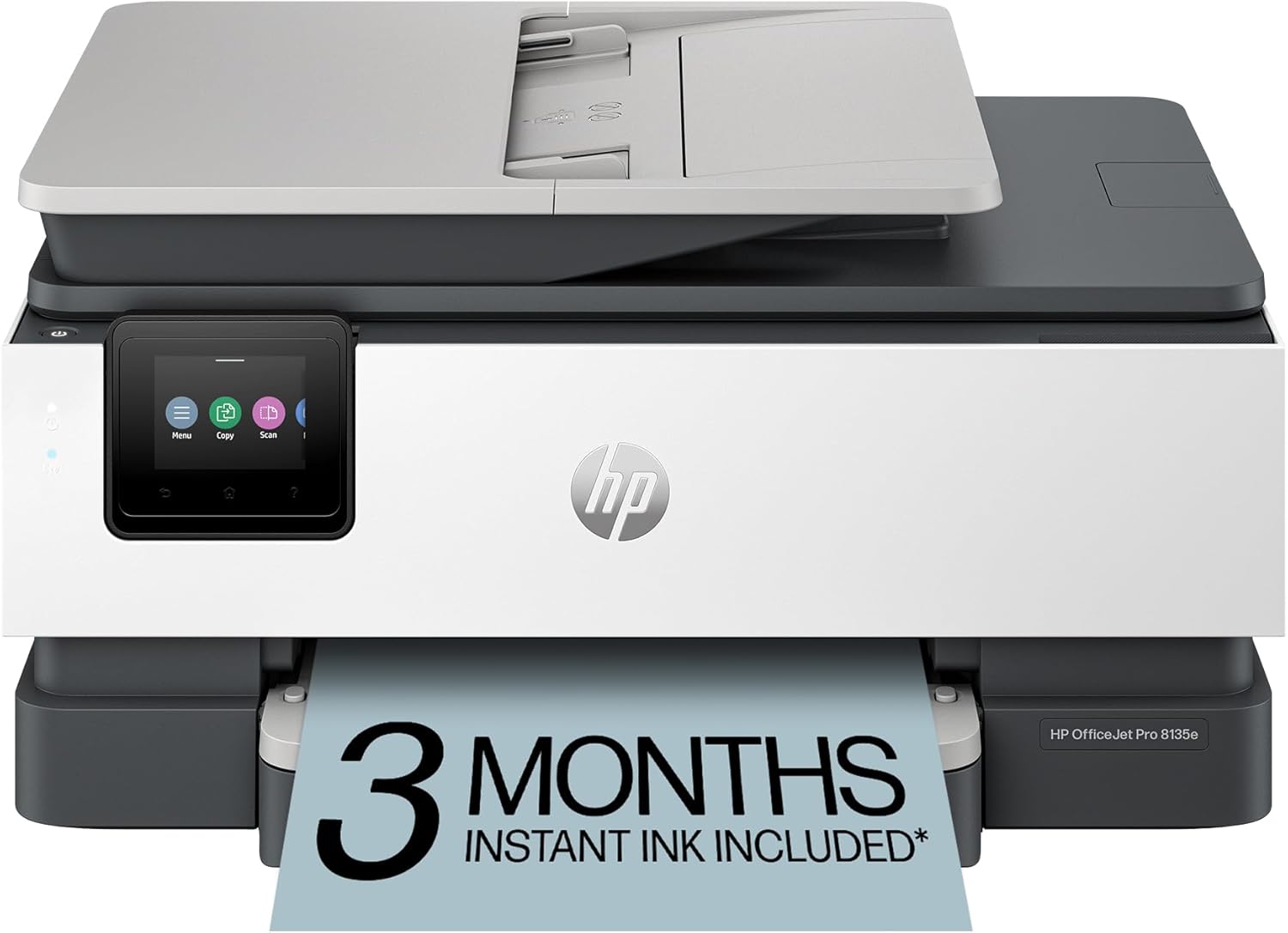
The HP OfficeJet Pro 8135e fits a household or home office that regularly handles ordinary paperwork and wants printing, scanning, copying, and faxing in one machine.
Its automatic document feeder can be useful when several pages need to be copied or scanned, while automatic two-sided printing reduces the need to manually turn paper over during longer print jobs. Those conveniences make more sense for someone who routinely works with forms and documents than for someone who occasionally prints.
There is an important distinction, however: the document feeder scans one side at a time, so it should not be confused with automatic duplex scanning.
The HP also uses replaceable ink cartridges. Its purchase price is in the same general range as the Canon and Brother models in this comparison, but the longer-term equation changes as cartridges are replaced. That difference becomes increasingly noticeable as printing volume rises.
(Price at Time of Publishing)
Canon PIXMA TR8620a

The Canon PIXMA TR8620a is aimed at a somewhat different household: one that needs everyday documents but also wants more flexibility for photo-oriented printing.
Its five individual ink cartridges and support for borderless photo printing distinguish it from a basic document printer. At the same time, an automatic document feeder and automatic two-sided printing make it useful for everyday household paperwork.
That combination does not mean it automatically produces better photographs or documents than the other printers here. Print quality was not the basis of this comparison.
The five-ink system also means that replacement needs depend on what you print. A household producing color-heavy pages or photographs may consume individual colors differently, and standardized document yields may not reflect photo-heavy use particularly well.
Canon has the lowest recorded purchase price among the five printers in this comparison, but the checkout price alone does not determine the five-year cost.
(Price at Time of Publishing)
Brother MFC-J1800DW

The Brother MFC-J1800DW combines conventional home-office functions with a paper-cutting feature.
It can print, scan, copy, and fax, but its more distinctive feature is the ability to automatically cut Letter-size output into Half Letter sheets. That could be convenient for someone whose work or household routine uses this feature, perhaps for school projects or crafting.
For everyone else, the cutter may simply be an extra feature. It should not be viewed as an automatic cost-saving advantage.
The Brother remains a cartridge-based printer, so replacement ink still matters as printing volume climbs. That makes it a useful example of why two printers with similar purchase prices can end up with different long-term costs.
In this comparison, the Brother begins at roughly the same price level as the HP and Canon. What separates them over five years is not simply the equipment price, but how much replacement ink the modeled household consumes.
(Price at Time of Publishing)
Epson EcoTank ET-2980

The Epson EcoTank ET-2980 takes the opposite approach to conventional cartridge printers.
Instead of regularly replacing small cartridges, the printer uses refillable ink tanks. The initial purchase price is higher than the three cartridge-based models in this comparison, but the included ink and replacement-bottle yields change the ongoing-cost calculation substantially.
The ET-2980 provides printing, copying, flatbed scanning, and automatic two-sided printing, which covers many common household tasks. It does not, however, include an automatic document feeder. Someone who frequently scans or copies stacks of paperwork may find that omission more important than the lower modeled ink expense.
The included ink matters for the five-year estimate because it can change the total cost based on how much the user prints. But claims about “years of ink” depend on assumptions about monthly printing. They should not be treated as a guaranteed number of years for every household.
(Price at Time of Publishing)
Xerox C303a

The Xerox C303a represents the color-laser option in this comparison and is geared more heavily toward document-based work.
It prints, scans, copies, and faxes, and combines automatic two-sided printing with a duplex document feeder. For someone regularly processing multi-page, two-sided office documents, those workflow features may matter considerably.
The trade-off begins with price. At $499 in our recorded comparison, Xerox has the highest upfront cost of the five. Replacement toner can also become expensive as page volume rises.
Its larger physical footprint and document-oriented design are worth considering as well, particularly for households more interested in photo-oriented printing.
Most importantly, laser technology should not automatically be interpreted as meaning lower cost, better reliability, or greater value. In this particular five-year model, Xerox’s total cost increases the fastest as printing volume moves into the heavy-use scenario.
(Price at Time of Publishing)
Before the Full Comparison: What Costs Keep Adding Up?
Three costs make up our base five-year estimate.
The first is the manufacturer’s purchase price. The second is replacement ink or toner, using the relevant consumable prices and expected page yields in the working model. The third is electricity.
Starter ink and toner are also credited where the comparison has a usable page allowance, because included consumables can delay the first replacement purchase. Marketing language such as “years of ink,” however, does not by itself tell you how many pages your household will actually print.
Electricity is included for completeness, but it is a relatively small cost when compared with ink and toner in this comparison. The larger differences come from what happens after the included consumables are used.
The Full Five-Year Cost Comparison
For the base calculation, we used:
Estimated five-year base cost = purchase price + estimated replacement ink or toner + estimated five-year electricity
Paper, subscriptions, repairs, taxes, and other possible expenses are not included in this base figure.
Estimated Five-Year Cost at Three Usage Levels
| Printer | Purchase Price | Light Use 15 pages/month |
Typical Use 50 pages/month |
Heavy Use 150 pages/month |
|---|---|---|---|---|
| Canon | $215.99 | $277 | $434 | $883 |
| Brother | $229.99 | $289 | $443 | $882 |
| HP | $239.99 | $295 | $422 | $787 |
| Epson | $329.99 | $336 | $336 | $412 |
| Xerox | $499.00 | $514 | $735 | $1,473 |
The differences are fairly modest at the light-use level because relatively few replacement cartridges and ink are needed. In that scenario, the initial purchase price remains a major part of the total.
That changes at typical use. By the end of five years, a household in our typical-use scenario has printed 3,000 pages. Replacement consumables now begin separating printers that originally sat fairly close together under light usage.
At 150 pages per month, the pattern becomes much clearer. The heavy user reaches 9,000 pages over five years, and ink or toner becomes one of the largest factors in the ownership calculation. In the current model, the estimated totals range from approximately $412 for the Epson to $1,473 for the Xerox.
That does not make one printer universally “better” than another. The Xerox, for example, provides a document workflow that the Epson does not, including its duplex document feeder. The question is whether those capabilities matter enough to the individual user to justify the different ownership cost.
Where the Money Goes
| Printer | Purchase price | Five-year electricity | Consumables: Light | Consumables: Typical | Consumables: Heavy |
|---|---|---|---|---|---|
| HP 8135e | $239.99 | $10.00 | $45.01 | $172.01 | $537.01 |
| Canon TR8620a | $215.99 | $8.00 | $53.01 | $210.01 | $659.01 |
| Brother J1800DW | $229.99 | $8.00 | $51.01 | $205.01 | $644.01 |
| Epson ET-2980 | $329.99 | $5.60 | $0.41 | $0.41 | $76.41 |
| Xerox C303a | $499.00 | $14.55 | $0.45 | $221.45 | $959.45 |
Included-consumables note: The five-year estimate credits the ink or toner supplied with each printer, as applicable, before adding replacement costs. Replacement ink or toner is only counted after that included supply is estimated to be used. This is why some light-use scenarios show little or no replacement-consumable cost.
This table illustrates why electricity, while worth including, is not driving the outcome. Five-year electricity differences amount to only a few dollars among these printers.
Consumables are where the lines begin to separate.
For a light user, that may not be particularly important. Paying more upfront solely to reduce ink costs may not make sense if only 900 pages will be printed over five years.
The typical user begins to see a different picture. At 3,000 pages, replacement ink or toner has had enough time to make the shelf price less useful as a guide to overall spending.
For a heavy user, consumables can overwhelm the original difference in purchase price. That is why a printer that looks expensive on day one may end up relatively inexpensive to operate in the long run, while an initially less expensive machine can cost considerably more after years of replacement cartridges or toner.
(15 pages/month)Typical Use
(50 pages/month)Heavy Use
(150 pages/month)
- Canon
- Brother
- HP
- Epson
- Xerox
The useful comparison is therefore not simply “Which printer costs less?”
It is:
“Which printer provides the functions I need at a long-term cost that makes sense for the amount I actually print?”
Reader Q&A
What assumptions shape the five-year estimates?
The three usage scenarios apply consistent page counts, black-and-white/color treatment, and electricity assumptions across the comparison.
The working model gives the HP no starter-ink credit because its included page yield remains unverified. Canon and Brother each receive an estimated 200-page starter-ink credit. Epson uses an inferred 4,500-page included-ink allowance, while Xerox receives a 1,200-page starter-toner credit.
These are comparison assumptions, not guarantees of how many pages an individual household will receive from the included supplies.
What about the purchase cost?
We used the manufacturer-listed price to estimate the total cost of ownership. Actual costs can vary significantly when you purchase from a third-party site like Amazon. Prices change over time and can also affect how much you spend over 5 years of ownership.
Should an ink subscription be added to the estimate?
Not automatically.
A subscription is a different purchasing model. To evaluate one fairly, you would need to look at the monthly price, page allowance, overage charges, rollover rules, promotional trial period, cancellation terms, and whether the printer is eligible.
If a subscription is being compared with buying cartridges normally, its cost should replace the corresponding estimated ink expense rather than being added on top of it.
Are paper, repairs, and unexpected maintenance included?
No.
The base estimate contains only the printer purchase price, estimated replacement ink or toner, and estimated electricity. Paper, repairs, and unexpected maintenance should be considered separately rather than assuming that an expense is zero simply because reliable data is unavailable.
Does a five-year estimate mean the printer will last five years?
No.
Five years is a comparison horizon. It assumes the printer remains in service so the ownership costs can be compared consistently. It does not predict actual lifespan, failure rates, or print quality.
A Simple Printer Decision Checklist
Before buying, ask yourself:
- What do I actually print, and which usage profile comes closest to my routine?
- Do I need color or photo-oriented functions?
- Do I regularly scan or copy multiple pages?
- Do I need automatic two-sided scanning, or only two-sided printing?
- Will the printer work with my devices and fit comfortably in the available space?
- What ink or toner comes in the box?
- What will replacement consumables cost at my printing volume?
- Have I separately considered subscriptions, warranty coverage, support, and possible repair costs?
Choose Based on How You Actually Print
The cheapest printer on the shelf is not always the least expensive printer to own, but the printer with the lowest five-year estimate is not automatically the right one either.
Start by identifying how much you actually print. Then narrow the choices according to the functions you will genuinely use – documents, photos, scanning, copying, document feeding, or two-sided work. Finally, use the five-year estimate to see whether the purchase still makes sense once ink, toner, and electricity are taken into account.
Once you look beyond the price tag, choosing a printer becomes less about finding the model with the longest feature list and more about finding the one that fits the way you actually print.