SEARCH


An invitation to a closed-door roundtable or executive summit can feel like a career milestone. It could also be bait.
According to Microsoft, a Russian state-linked hacking group has spent 2026 sending fake event invitations to professionals, then following up with files that look legit but can install a backdoor on a Windows computer.
Luckily, you don’t need technical skills to protect yourself. With a short checklist and a willingness to pause before you reply, it’s possible to safely check your invite and discern what’s happening before your security is compromised.
Quick Answer: How Can You Tell if an Event Invitation Is a Phishing Scam?
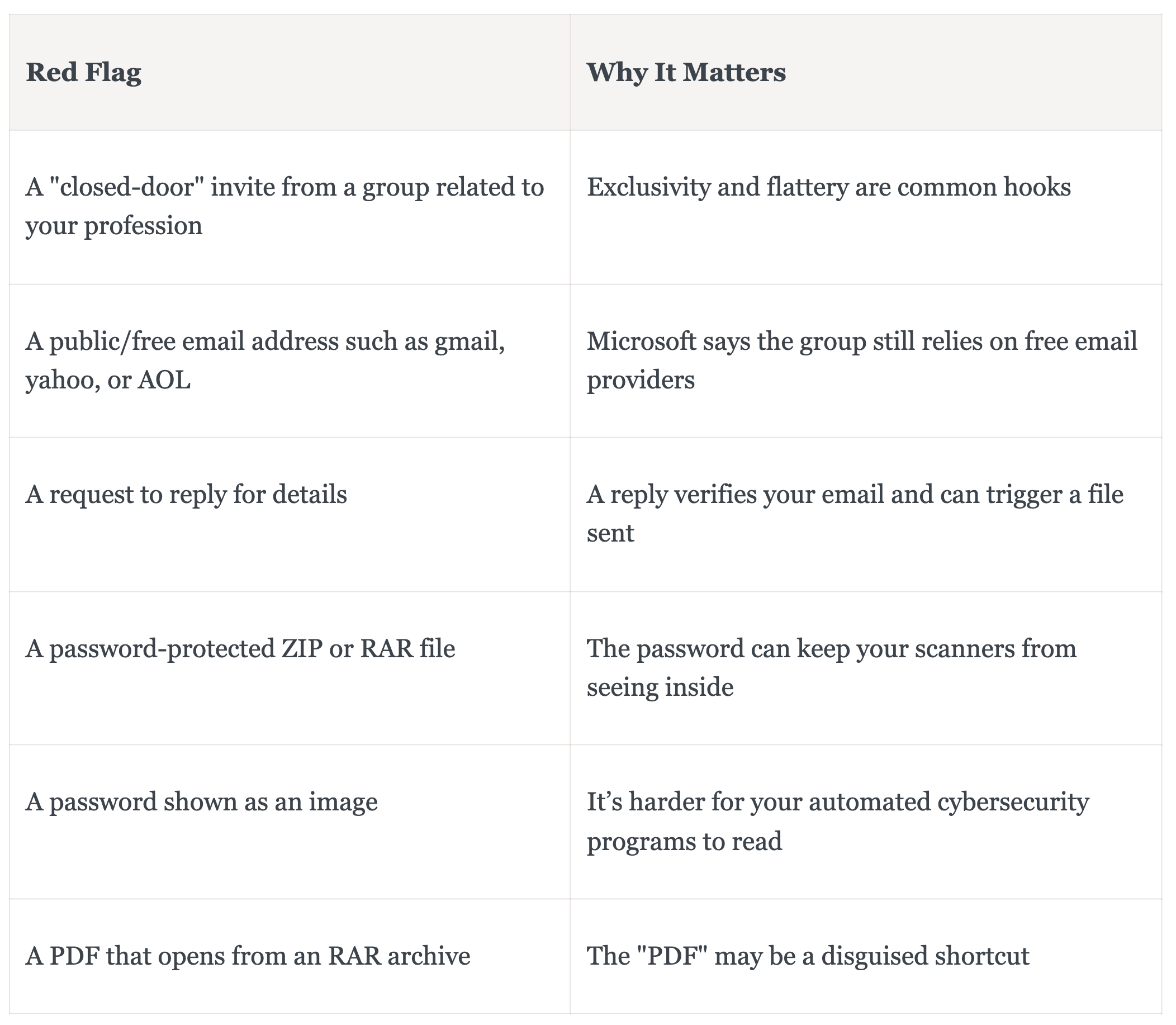
Check the invitation through a source you already trust before you reply or open anything. For example, if the organizer is legitimate, look up the event on their official website or call a phone number you have used before—but not one listed in the email. Be extra careful with unexpected invites, public/free email addresses (e.g., gmail, yahoo, AOL), requests to reply for details, and password-protected ZIP or RAR files. No single sign listed here proves a scam, but several together are a good reason to stop and reach out to your IT team.
What Microsoft Found About Star Blizzard
On Sept. 29, 2026, Microsoft reported that Star Blizzard, a group the U.S. Cybersecurity and Infrastructure Security Agency (CISA) links to Russia’s FSB, ran at least 13 phishing campaigns between January and August.
The activity affected more than 100 organizations, mainly in the United States and the UK. Security researchers who summarized the report noted that nine of the 13 subject lines were event invitations, and five described the event as “private roundtable” or “closed door.”
The scam is not new. Researchers have tied the group to fake conference invitations since at least 2023. What’s new is the scale and the delivery method.
How the Fake Invitation Trap Works
The attack often unfolds in stages:
-
A friendly email invitation arrives. It frequently has no attachments, so it passes simple checks.
-
You reply with interest, but that response tells the sender your account is active.
-
A second email delivers a legitimate-looking file. It is usually a password-protected ZIP or RAR archive, with the password shown as an image.
-
Inside, a shortcut file may be disguised as a PDF. Opening it can start a chain that installs a backdoor, which lets attackers in to run code and pull files from the computer.
Even though the follow-up email claims to be “password protected,” it doesn’t make it safe because the sender is the one who chose that password.
Why This Matters for Your Money
A compromised computer can expose saved logins, tax documents, client files, and financial account access. The Star Blizzard group has also run password phishing with a tool that can steal session cookies, which may help them get around some sign-in codes.
For freelancers and small business owners, one bad click can mean putting both personal and business accounts at risk.
Red Flags in an Unexpected Invitation
A Simple Verification Routine
Try these steps before you answer any surprise invitation:
-
Pause. Don’t reply or click anything until you’ve completed the checks below.
-
Search for the event yourself. Type the event name into a search engine and look for the organizer’s official page.
-
If the event is real, call or email through the official site to verify details—never use the contact info in the message.
-
Ask a colleague or manager. See whether others received the same invite.
-
Don’t open ZIP, RAR, or shortcut files from an unverified sender. Ask IT to inspect it.
Microsoft recommends strengthening your sign-ins with phishing-resistant authentication such as passkeys or hardware security keys, on important accounts.
And, as always, keep your software updated to get the latest security patches.
If You Already Replied or Clicked
Stay calm and follow these steps:
-
Stop replying and tell your IT team or a security professional.
-
If you opened a file, disconnect the device from the internet.
-
Change passwords from a different, clean device, starting with your email and banking accounts.
-
Turn on account alerts for your bank and brokerage accounts.
-
Consider a credit freeze. It’s free at Equifax, Experian, and TransUnion.
-
Report it to the FTC at ReportFraud.ftc.gov and the FBI at ic3.gov.
FAQs: Fake Event Invitation Phishing
What Is a Fake Event Invitation Scam?
It’s a phishing attempt that uses an invitation to a conference, roundtable, or summit as bait. The goal is to get you to reply, click a link, or open a file. Attackers often copy the name of a real organization or a trusted contact so the message feels familiar. The invitation itself is usually harmless, but the follow-up steps are where things typically become dangerous.
Is It Safe to Reply to a Suspicious Invitation?
It may not be. In the campaigns Microsoft described, a reply triggered a second email carrying the malicious file. A reply also tells the sender your account is active. Verify the event through the organizer’s official website or a phone number you already trust before you respond, and ask your IT team if you are unsure.
Does Multifactor Authentication Stop These Attacks?
It helps, but not all methods are equal. Some phishing tools can steal session cookies and get around text-message codes, so a code alone may not be enough. Passkeys and hardware security keys are considered phishing-resistant, which makes them a stronger option for email, banking, and brokerage accounts. Check which options each provider offers.
Where Do I Report Phishing in the US?
Report it to your employer’s IT team first if it reached a work account. You can also file a report with the Federal Trade Commission at ReportFraud.ftc.gov and with the FBI’s Internet Crime Complaint Center at ic3.gov. Reports help investigators spot patterns. If you lost money or shared financial details, contact your bank or card issuer right away.
The Epoch Times copyright © 2026. The views and opinions expressed are those of the authors. They are meant for general informational purposes only and should not be construed or interpreted as a recommendation or solicitation. The Epoch Times does not provide investment, tax, legal, financial planning, estate planning, or any other personal finance advice. The Epoch Times holds no liability for the accuracy or timeliness of the information provided.